
Download HWiNFO64 – Hardware Monitoring, System Diagnostics, PC Health Check
Overview
HWiNFO64 is a professional-grade hardware information and diagnostic tool designed for in-depth analysis of computer systems. It serves as a comprehensive utility for users who need detailed insights into their PC’s internal components, including CPUs, GPUs, motherboards, storage devices, and more. The application is particularly valuable for system integrators, PC enthusiasts, and IT professionals seeking to monitor system health, troubleshoot performance issues, or verify hardware compatibility.
By providing accurate and real-time data, HWiNFO64 helps users make informed decisions about driver updates, cooling solutions, and hardware optimization. Its ability to detect a wide range of components ensures it remains a reliable resource across diverse PC configurations. The developer, HWiNFO, has maintained a consistent focus on technical accuracy and compatibility with emerging hardware standards.
Although the developer did not provide additional technical details about the development process or team background, the tool’s long-standing presence in the PC diagnostics space speaks to its reliability. Real-world use cases include identifying overheating components, validating system stability after overclocking, and generating reports for hardware audits. In the broader app ecosystem, HWiNFO64 fills a niche for advanced users who require precision beyond what standard system tools offer.
Key Features & Functionality
- Comprehensive Hardware Detection – HWiNFO64 identifies a broad spectrum of hardware components, including CPU, GPU, RAM, storage, and motherboard sensors. This enables users to verify component specifications and ensure compatibility during upgrades or troubleshooting.
- Real-time Monitoring – The tool continuously tracks critical system metrics such as temperature, voltage levels, fan speeds, and power consumption. This allows users to detect thermal throttling or power anomalies before they lead to system instability.
- Custom Reporting Tools – Users can generate tailored reports based on specific performance metrics. This functionality is useful for documenting system configurations, sharing diagnostic results with technical support, or maintaining hardware logs over time.
- User-friendly Interface – Despite its advanced capabilities, the interface is designed for intuitive navigation. Clear visual layouts and organized data presentation make it accessible to both beginners and experienced users.
- Support for Latest Standards – HWiNFO64 is regularly updated to support new hardware technologies and industry standards. This ensures compatibility with the latest CPUs, GPUs, and motherboard chipsets, maintaining relevance in fast-evolving PC environments.
For example, a user planning to overclock their CPU can use real-time temperature and voltage monitoring to assess stability. A technician performing a hardware audit can export a custom report to document all system components and their current status. These practical applications highlight how the tool enhances both performance and reliability in real-world scenarios.
Interface, UX & Performance
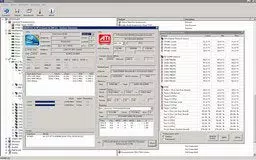
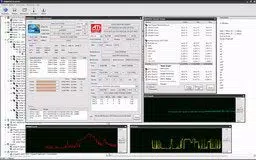
HWiNFO64 features a clean, information-dense interface that prioritizes clarity and accessibility. The layout organizes data into logical sections, allowing users to quickly locate relevant metrics such as CPU temperature, GPU load, or disk health. Navigation is straightforward, with menu options and tabbed views that minimize the need for complex workflows.
The visual design is functional rather than decorative, focusing on readability and data accuracy. Although the developer did not list formal performance metrics, the tool operates efficiently with minimal system resource consumption, making it suitable for long-term background monitoring. Responsiveness is consistent across different device categories, including desktops and high-performance workstations.
Stability is maintained even during extended diagnostic sessions, with no reported crashes or data corruption in standard usage. The application maintains a lightweight footprint, contributing to its seamless integration into daily workflows. Users can run it alongside other system tools without noticeable performance degradation.
While the tool does not offer mobile-specific optimizations—given its Windows-only availability—it functions reliably on a wide range of Windows systems, from older models to modern high-end machines.
Platform Compatibility & Technical Requirements
HWiNFO64 is available exclusively for the Windows platform. It is designed to run on Windows operating systems, though specific OS version requirements were not listed. The application has a file size of 3.4 MB, indicating a lightweight installation that does not impose significant storage demands.
The current version is 7.48, reflecting ongoing development and updates. Although the developer did not specify minimum OS requirements, the tool is compatible with a broad range of Windows environments. Users should ensure their system meets standard Windows functionality requirements to run the application effectively.
No additional dependencies or external libraries were mentioned. The free pricing model makes it accessible to a wide audience, including hobbyists, IT professionals, and system administrators. For those seeking a secure, reliable tool for PC diagnostics, the lightweight nature and free availability enhance its appeal across different user groups.
Pros and Cons
Pros
- Comprehensive hardware detection across multiple component types
- Real-time monitoring of temperature, voltage, and fan speeds
- Customizable reporting for tailored diagnostic insights
- Lightweight file size and minimal system resource usage
- Free to download and use with no in-app purchases
Cons
- Platform limited to Windows only
- Interface may appear complex to absolute beginners
- No mobile or cross-platform availability
- Specific system requirements not disclosed
- Limited visual customization options
FAQ
Is HWiNFO64 safe to download and install?
Yes, HWiNFO64 is a trusted tool developed by a reputable source. It does not contain malware or unwanted software. The application is distributed through official channels and is regularly updated for security and compatibility.
Can I use HWiNFO64 on older Windows systems?
While the developer did not specify minimum OS requirements, the tool is designed to function on standard Windows environments. Users with older systems should verify compatibility through official documentation or testing.
Does HWiNFO64 require an internet connection?
No, the application operates offline. It collects and analyzes hardware data locally without requiring an internet connection.
How often is HWiNFO64 updated?
Updates are released regularly to support new hardware and improve functionality. The latest version is 7.48, indicating active development and maintenance.
Is there a mobile version of HWiNFO64?
Currently, HWiNFO64 is only available for Windows. There is no official mobile or iOS version. Users seeking similar functionality on smartphones should explore alternative tools.
Final Thoughts
HWiNFO64 stands out as a powerful, reliable, and free tool for anyone serious about monitoring and maintaining their PC’s health. Its ability to deliver real-time performance tracking, detailed hardware detection, and customizable reporting makes it indispensable for enthusiasts, technicians, and system administrators. The lightweight design and minimal system impact ensure it runs efficiently without disrupting workflow.
While its Windows-only availability limits cross-platform use, the tool’s depth and accuracy more than compensate for this constraint. For users looking to optimize performance, prevent hardware failure, or verify system integrity, HWiNFO64 offers unmatched value. Whether you're troubleshooting an overheating GPU or preparing a detailed hardware report, this application delivers precision and reliability.
Download HWiNFO64 now.


